Name, email address, profile picture when available, and the Google Account's unique identifier.
 MelagerAndroid mobile app • v1.0
 OFFICIAL ANDROID APP WEBSITE
Melager — Meal and Mess Management Mobile App
Melager helps shared mess groups and their members manage memberships, daily meals, expenses, deposits, monthly balances, and administrative access in one Android application.
Today in Melager Live
24Members
47.5Meals
৳18,400Deposits
↗ 12% Monthly activity is up
PURPOSE AND CORE FEATURES
One Android app for shared meal and mess accounting
Melager gives each shared mess a clear monthly record of who ate, what the group spent, how much every member deposited, and each member's resulting balance. Members can record meals, track deposits and expenses, review shared calculations, and manage access according to their role.
GOOGLE SIGN-IN DATA USE
Why Melager requests Google account information
When a user selects Continue with Google, Melager requests only the basic identity information needed to create, identify, or sign in to that user's Melager account.
To authenticate the user and securely create or connect the correct Melager account.
Melager does not request access to Gmail messages, Google Drive files, contacts, calendars, or the user's Google password.
For details about collection, storage, sharing, retention, and deletion, read the Melager Privacy Policy. You can also review the Terms of Service or request account deletion.
Members first. Every feature is scoped to the selected mess and the member's role.
Safe by design. Sensitive changes require an email verification code.
Fast on mobile. Cached sessions and monthly snapshots reduce wait time.
APP PREVIEW
See Melager in action
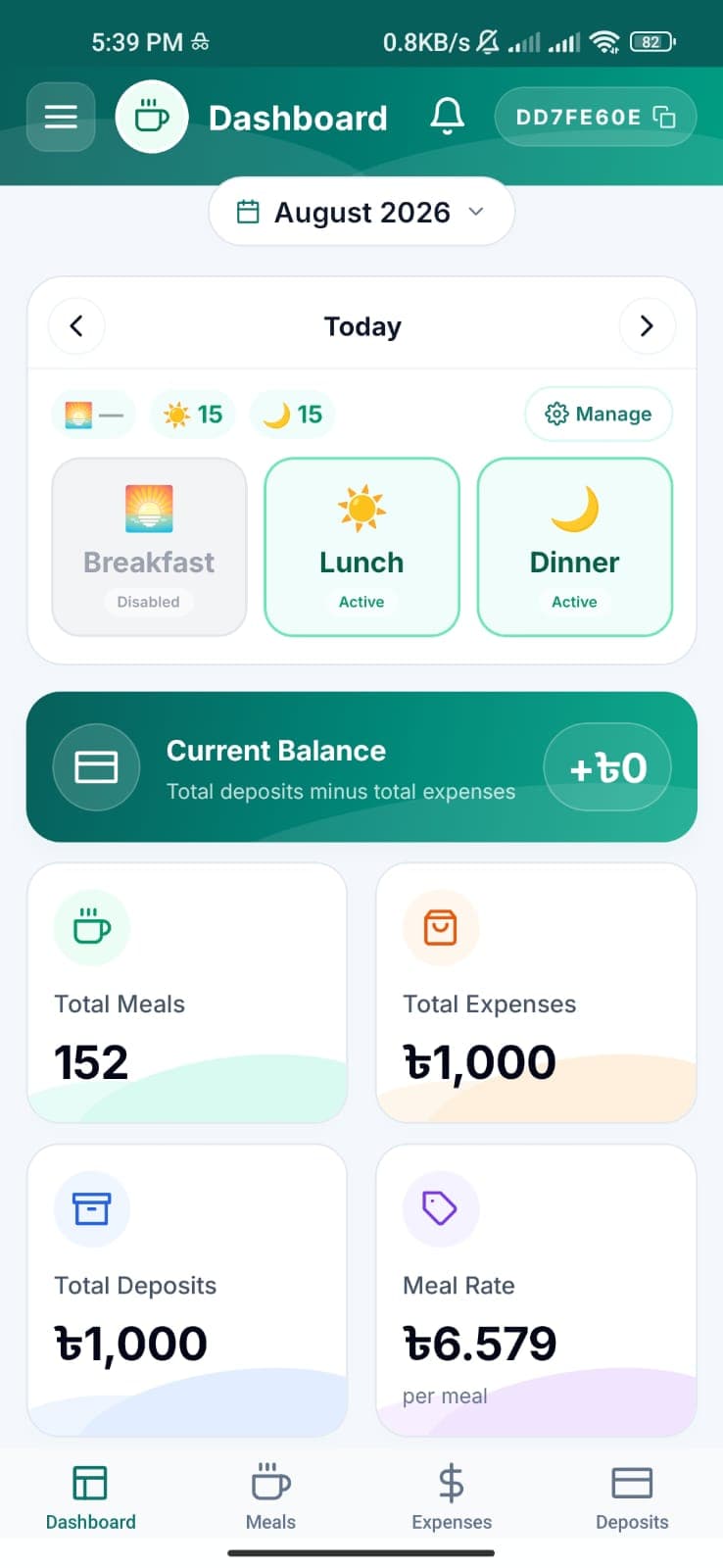
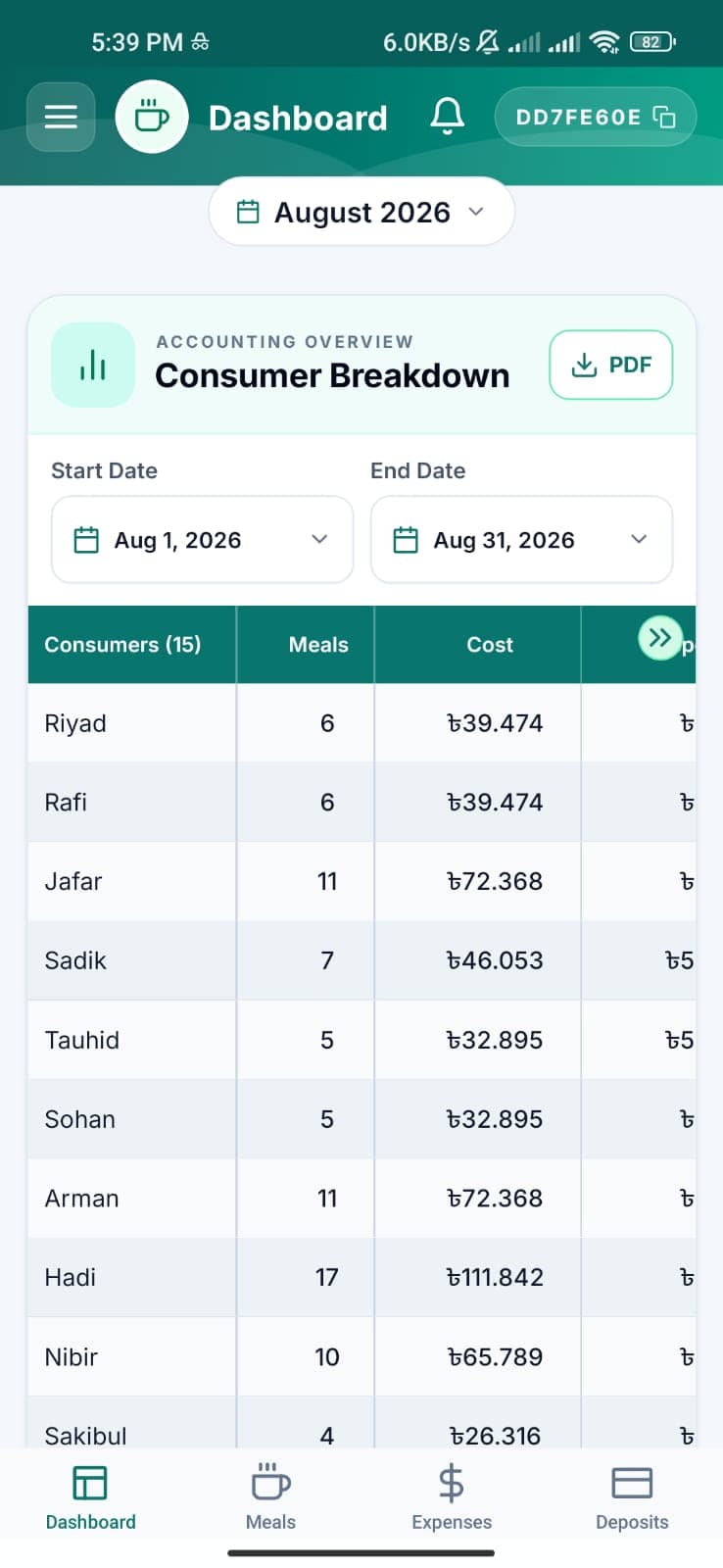
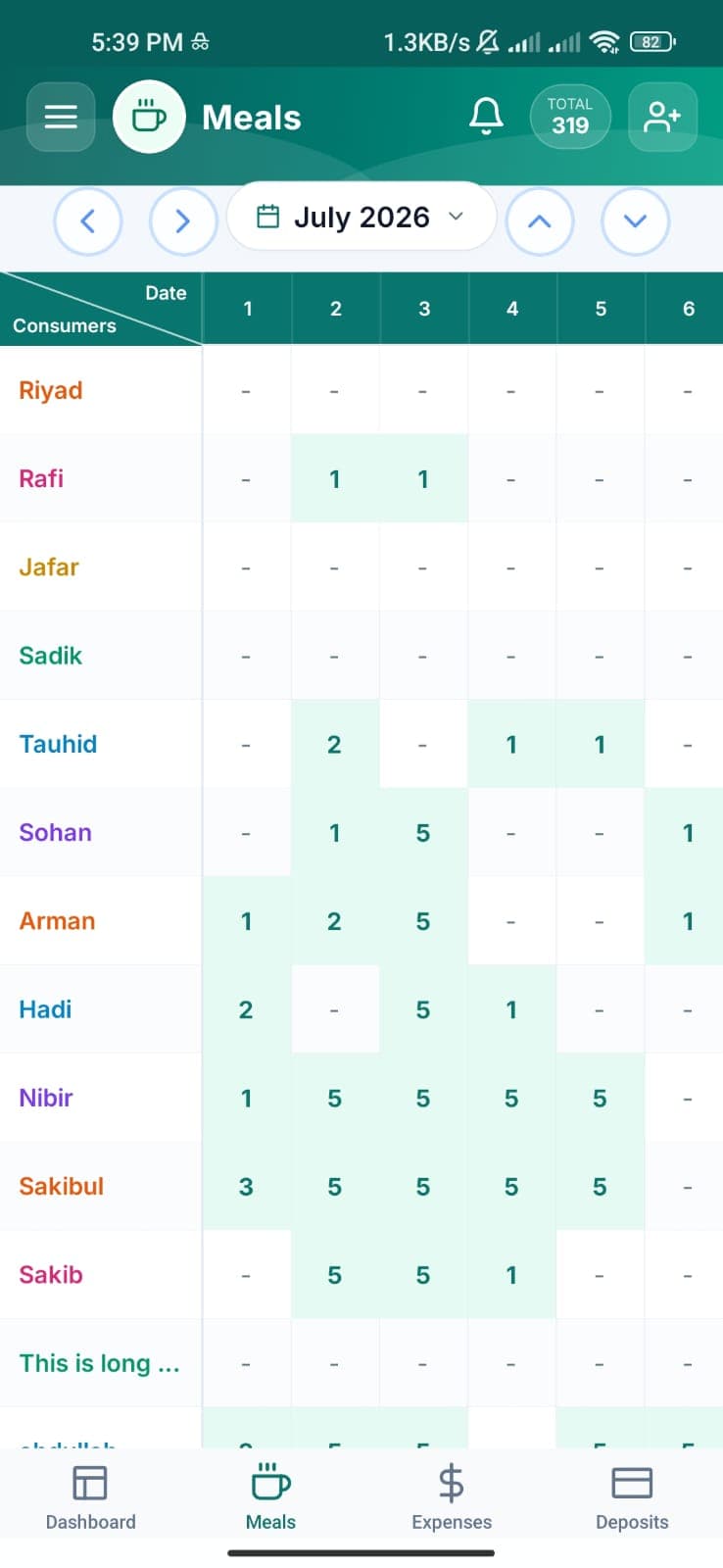
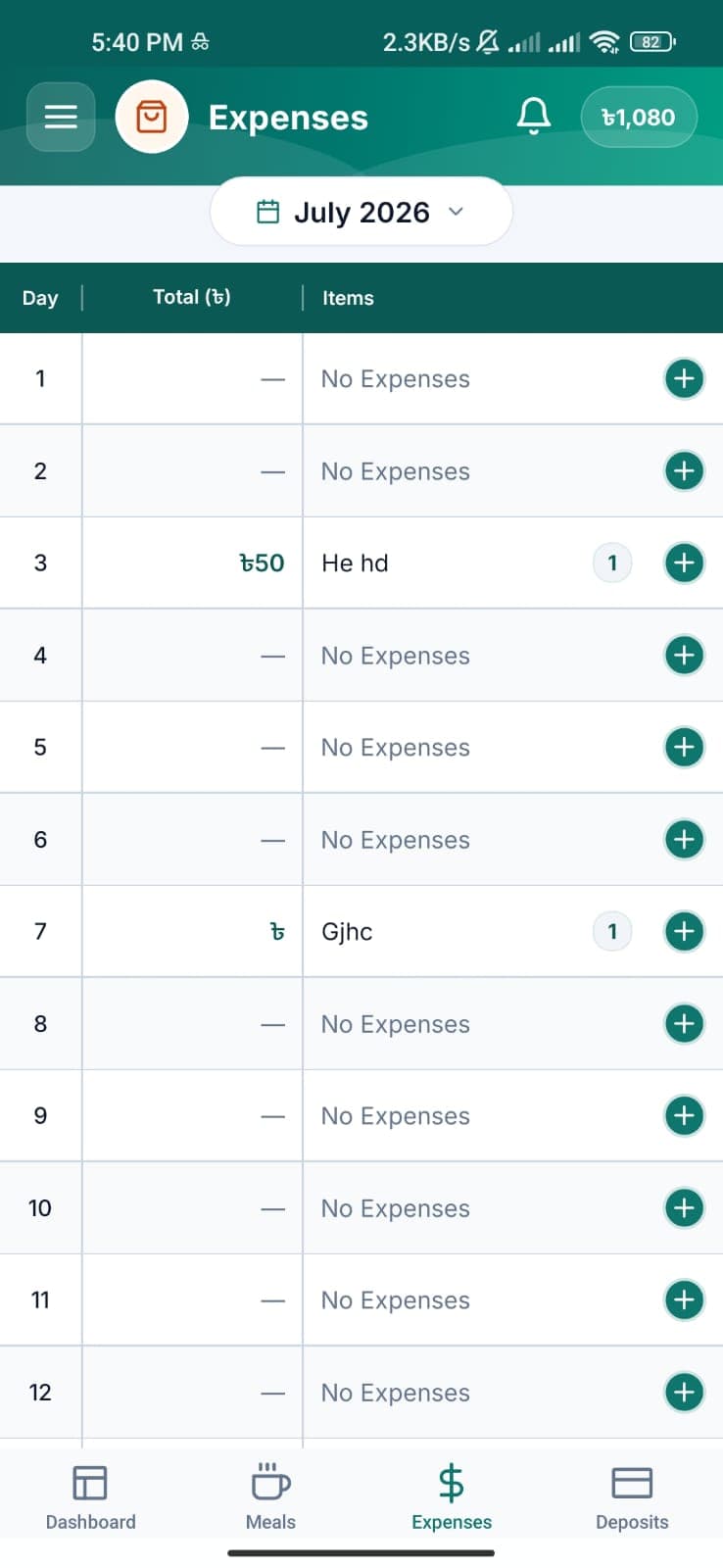
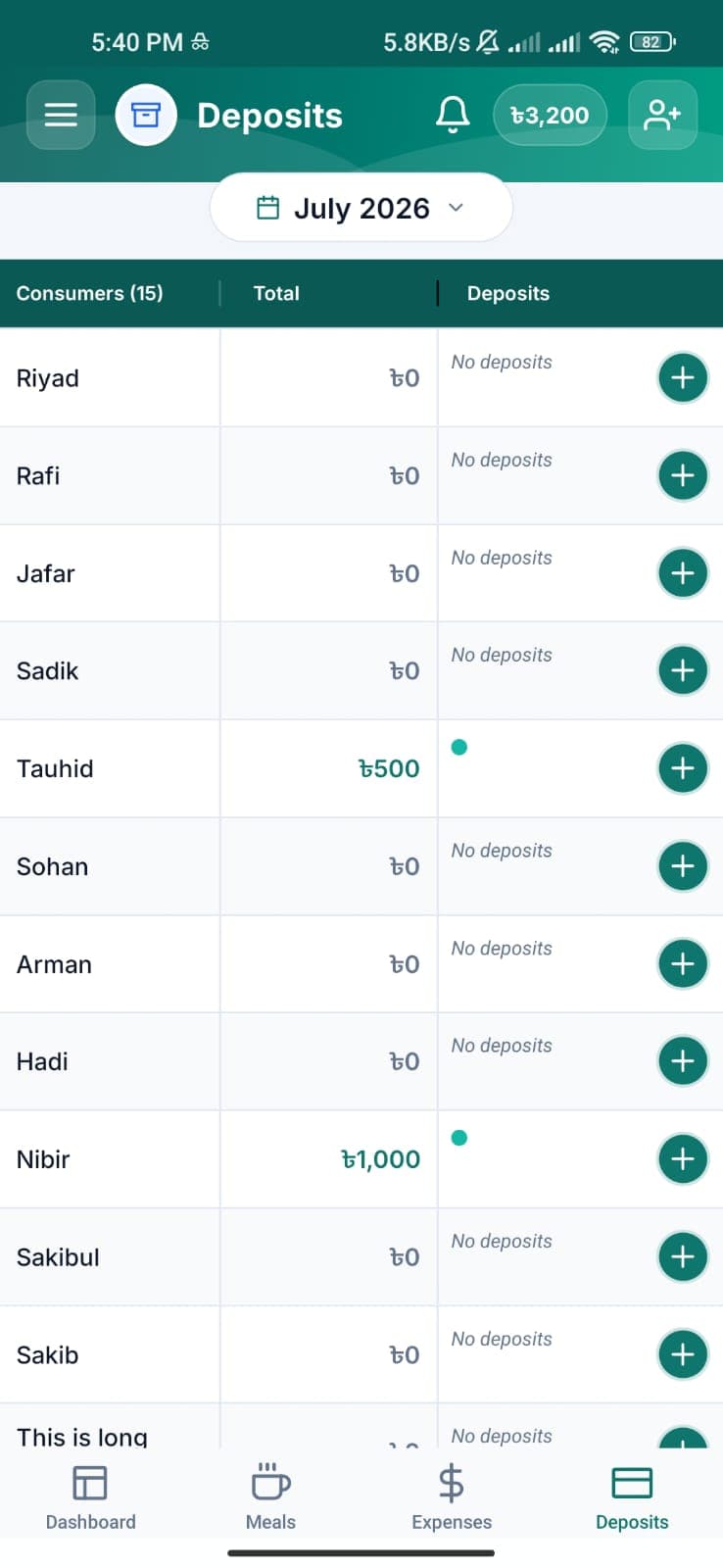
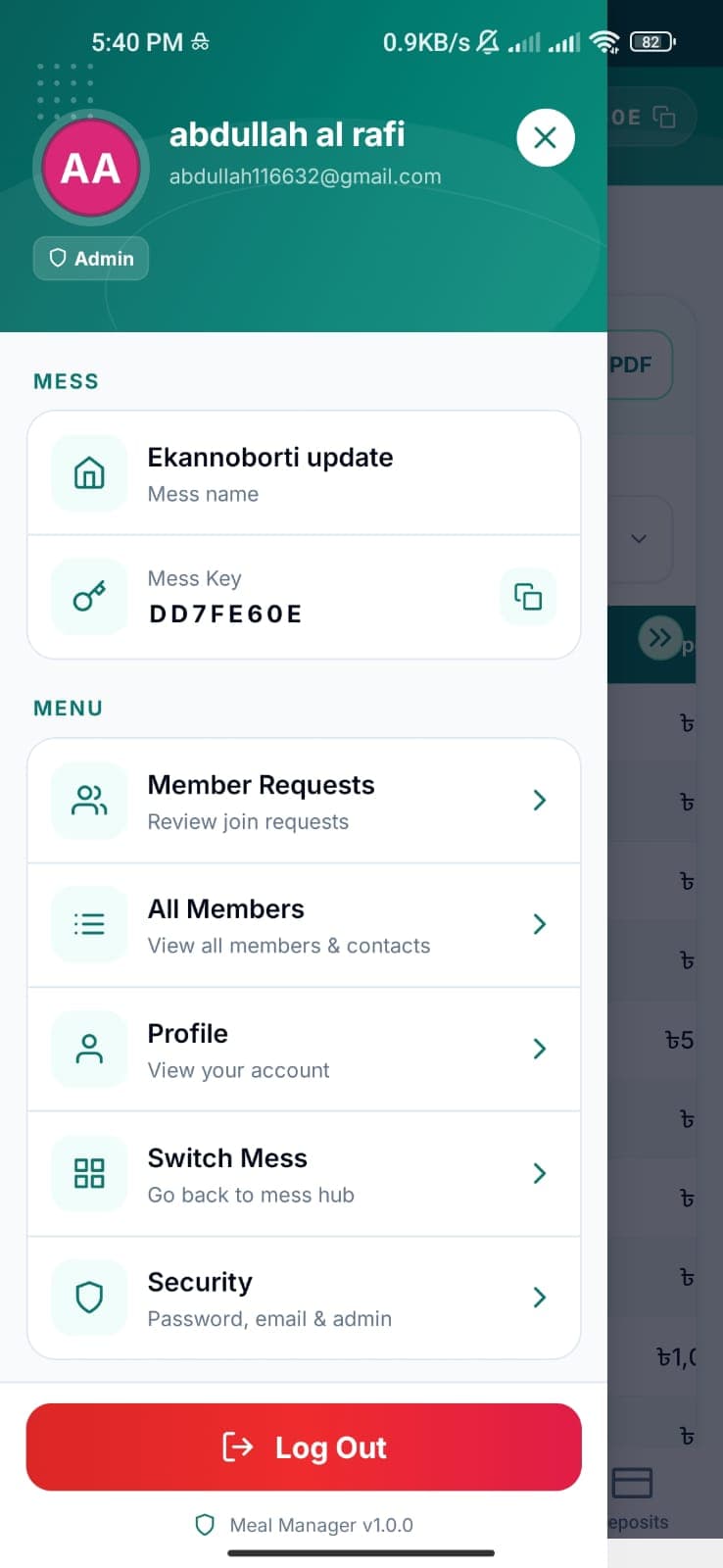
A closer look at the core mobile experience for tracking meals, expenses, deposits and shared mess accounting.
START HERE
From sign-in to a working mess
The normal path is deliberately short. New users can register with email verification, use Google sign-in, then create or join one or more messes.
01
Create an account
Sign up with name, email, password and optional phone, then confirm the six-digit email code.
02
Create or join a mess
Creators become primary admins. Members can request entry using a mess key and wait for approval.
03
Select your mess
The root hub keeps every membership in one place. Switch messes at any time without signing out.
04
Manage the month
Record meals, expenses and deposits, then review member balances from the dashboard.
ACCOUNTS & SECURITY
Sign-in that survives real life
Authentication and verification flows preserve the user's place when they leave the app to read an email.
Email registration OTP
A new email/password account remains pending until the email code is confirmed. The OTP screen persists if the user opens their mailbox and returns.
Continue with Google
Google ID tokens are verified on the backend. An existing verified email is linked to its Google account; new Google users are created directly.
Password recovery
Forgot-password requests use an email code before a new password is accepted. The reset code screen is also restored after app resume.
Persistent session
A JWT session is stored locally with a cached profile. The app restores known state first, then refreshes it in the background.
Security rule
Passwords are never stored in the mobile OTP flow. The backend retains only a temporary hashed payload until email verification succeeds.
MULTI-MESS
One account, any number of messes
Melager separates account identity from mess membership. A person may join different messes as a member in one and an admin in another.
MESS HUB
A focused start page
All active memberships and pending/rejected join requests appear on the root page. With more than four messes, the list scrolls while Create a New Mess and Join a Mess stay visible.
- Unique mess key for joining
- Retry a rejected join request
- Switch without ending the session
Account
Mess AAdmin
Mess BMember
Member requests
Admins can search pending requests by name or email, then accept or reject each request. Approval creates a linked consumer record in the mess.
All Members
Admins have a searchable member directory with contacts. They can add members, copy details and remove manually added members when no accounting records block deletion.
DAILY OPERATIONS
Track the numbers that matter
The selected month drives the core workspace. Navigation moves between months while each mess keeps its own records isolated.
MEALS
Meal grid
Admins enter per-member daily meal counts in a horizontally scrollable grid, with totals by member, day and month. Fill mode speeds up repetitive entries.
EXPENSES
Itemized daily costs
Each day holds multiple named expense items. Open a day to inspect its list, then add, remove or save entries from an optimized keyboard-aware sheet.
DEPOSITS
Payment history
Record timestamped deposits with optional notes. The app shows a ledger and a member history, while aggregate month totals remain visible.
DASHBOARD
Balance overview
Review meals, total costs, deposits and balances per consumer. Admins can export a PDF breakdown and send email summaries.
Daily meal control
Admins can set meal availability, opt-out windows and menus for breakfast, lunch and dinner. Members can opt out where a window allows it.
Offline-aware UI
Monthly snapshots are cached locally. Operations that need a server connection clearly require the device to be online.
ROLES & CONTROLS
Admin power with guardrails
Members see view-only accounting screens. Admin actions are protected by the selected mess and, for sensitive actions, an email OTP.
CapabilityMemberAdmin
View meals, expenses & depositsView onlyFull access
Create/edit accounting records—Yes
Approve join requests—Yes
Manage members—Yes
Edit daily meal controls—Yes
Change personal profile/securityYesYes
Transfer or add admins—OTP required
Multiple admins allowed
A mess may have more than one admin. Adding a co-admin leaves the current admin unchanged.
Transfer changes the role
When the primary admin role is transferred, the sender becomes a normal consumer and the selected member becomes primary admin.
Last admin protection
An admin cannot remove their own role if they are the only remaining admin in that mess.
TECHNICAL OVERVIEW
A mobile client and API that stay decoupled
The product is split into an Expo React Native app and an Express/Drizzle backend. This website is a third, independent Next.js project.
Expo mobile appExpo Router · React Native · AsyncStorage
HTTPS / JSON
Express APIJWT · validation · role checks
SQL
PostgreSQLDrizzle ORM · transactional writes
Mobile state
AuthContext holds the account, active mess and session. MessContext owns month data. Network, notifications and drawer behavior use separate providers.
Backend safeguards
Bearer JWT middleware protects private routes. Controllers validate mess access before returning or changing data. Unique database constraints prevent duplicate monthly cells and duplicate member requests.
API REFERENCE
The server contract at a glance
All API routes are prefixed with /api. Except for registration and sign-in routes, requests require an Authorization: Bearer <token> header.
POST
/auth/signupCreate a pending account and email a verification code.
POST
/auth/verify-otpVerify registration OTP and begin a session.
POST
/auth/loginSign in with email and password.
POST
/auth/googleVerify a Google ID token and sign in or link an account.
GET
/auth/meLoad the account, available messes and join requests.
POST
/mess/createCreate a mess; the creator becomes its primary admin.
POST
/mess/joinSubmit a join request using a mess key.
GET
/mess/data/:yearMonthGet consumers, meals, expenses and deposits for a month.
PUT
/mess/mealsWrite a meal count for a member and date.
PUT
/mess/expensesSave all expense items for a day.
POST
/mess/deposit-entryRecord a timestamped deposit entry.
POST
/settings/security/request-otpStart a protected security action by email OTP.
DELETE
/settings/accountVerify the password, delete the login account, and anonymize retained mess ledger records.
POST
/auth/account-deletion/request-otpEmail a short-lived account deletion verification code.
POST
/auth/account-deletion/confirmVerify the deletion code and anonymize retained mess ledger records.
EXAMPLE REQUEST
POST /api/mess/meals
Authorization: Bearer <session-token>
Content-Type: application/json

{
  "messId": 7,
  "consumerId": 24,
  "yearMonth": "2026-08",
  "day": 12,
  "count": 2
}
The backend scopes the write to the requested mess after checking that the authenticated user belongs to it with an appropriate role.
OPERATIONS
Configuration and deployment notes
Use separate environment configuration for the mobile client and API. The documentation project itself needs neither at runtime.
Mobile
Set EXPO_PUBLIC_API_URL and EXPO_PUBLIC_GOOGLE_WEB_CLIENT_ID in the EAS build profile. A native development or production build is required for Google Sign-In.
Backend
Configure PORT, DATABASE_URL, SESSION_SECRET, email delivery values and a comma-separated GOOGLE_CLIENT_IDS allowlist containing the web client ID.
Google sign-in
Register Android clients in Google Cloud using package com.melager.mobile plus each signing SHA-1. Keep one for EAS development and add a second one for Google Play App Signing.
Before shipping
Host this site with public HTTPS homepage, privacy, terms and deletion links Run mobile typecheck and create the Android App Bundle Add the Google Play App Signing SHA-1 as an Android OAuth client Complete Google OAuth branding and Play Console Data safety forms